
In this article, we’ll walk through how to deploy and run multiple Model Context Protocol (MCP) servers using Azure Container Apps, enabling AI agents to dynamically discover and invoke tools across specialized containers—each offering unique capabilities such as weather data, external API integration, and document retrieval using Azure AI Search.
We’ll explore two approaches for connecting AI agents to these MCP servers: LangGraph, which leverages a flow-based model for tool orchestration, and Semantic Kernel, which uses a plugin model to integrate services seamlessly. Both frameworks allow agents to interact with the servers behind a unified endpoint, accessed through an internal NGINX gateway that routes requests to the appropriate MCP service.

The code snippets and deployment examples in this article are a subset of the full solution available in the GitHub repository: jonathanscholtes/azure-ai-foundry-agentic-workshop. For complete source code and environment configuration, refer to the full repo.
In this article
- What is Model Context Protocol (MCP)?
- Why Use Azure Container Apps for Running MCP Servers?
- Deploying Azure Container Apps with Bicep
- Unpacking the MCP Server Code
- Connecting to MCP Servers with LangGraph and Semantic Kernel
- Conclusion
What is Model Context Protocol (MCP)?
The Model Context Protocol (MCP) is a protocol designed to enable AI models to interact seamlessly with external tools and services. It serves as a standardized communication bridge, enhancing tool integration, accessibility, and the reasoning capabilities of AI systems.
Why Use MCP?
Traditional AI systems often bake tool logic directly into the model’s prompts or system instructions, making them brittle and hard to extend. MCP enables:
- Dynamic discovery: Agents can retrieve a server’s available capabilities at runtime without hardcoded assumptions.
- Remote tool execution: Tools are externalized as services, promoting scalability and reuse.
- Modular architecture: Each server can focus on a single domain (e.g., weather, document retrieval, external APIs).
- Flexibility: New tools can be added without retraining or redeploying the model.
Why Use Azure Container Apps for Running MCP Servers?
Azure Container Apps is a serverless platform that enables you to run containerized applications with minimal infrastructure overhead and reduced operational costs — making it a natural fit for hosting MCP servers.
Key benefits include:
- Scalability: Automatically scales containers based on HTTP traffic, CPU, or memory usage, ensuring your services remain responsive and highly available.
- Managed ingress: Supports built-in HTTP ingress with custom domains and TLS certificates, simplifying external access.
- Environment isolation: Each MCP server (e.g., weather, search, data integration) runs as a dedicated container within a single Container App environment. NGINX serves as an internal gateway, routing requests and keeping internal services isolated from external traffic.
- Streamlined deployment: Seamless integration with Azure Container Registry (ACR), GitHub Actions, and Bicep templates enables efficient CI/CD pipelines for building, deploying, and updating all containers in one unified workflow.
Deploying Azure Container Apps with Bicep
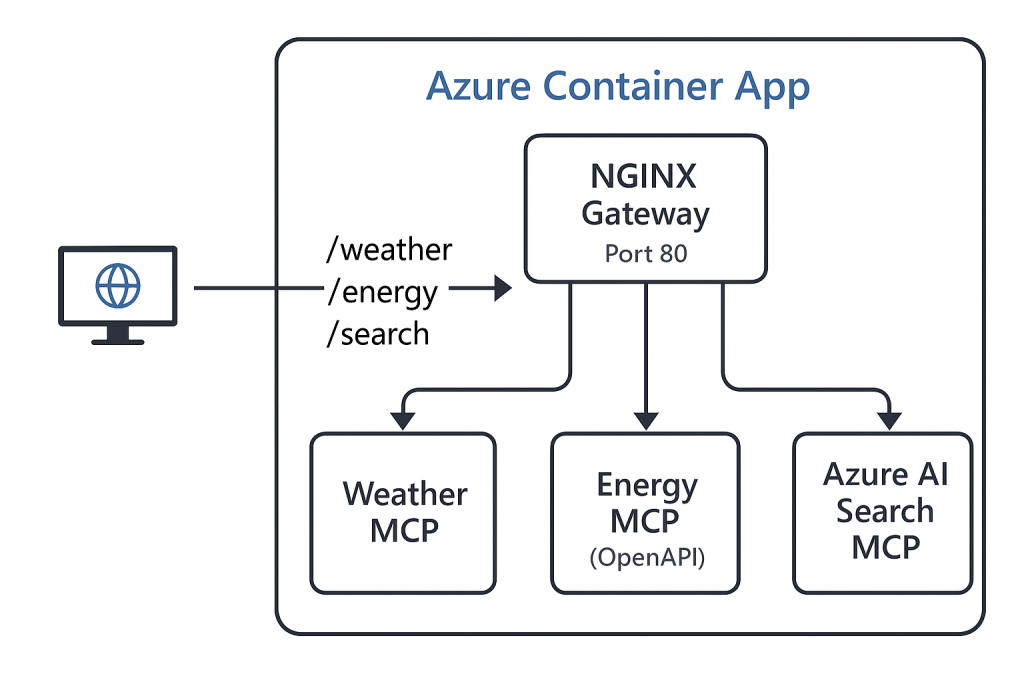
This solution uses Azure Bicep to streamline infrastructure deployment and ensure repeatability. The Bicep template provisions an Azure Container App with four containers:
- An NGINX gateway (the only container exposed on port 80)
- A Weather MCP server
- An OpenAPI integration MCP server (
energy) - An Azure AI Search MCP server
NGINX handles internal routing between containers, exposing a unified interface while keeping backend services isolated.
see full code at mcp-container-app.bicep
resource mcpApp 'Microsoft.App/containerApps@2023-05-01' = {
  name: 'ca-mcp-${containerAppBaseName}'
  location: location
  identity: {
    type: 'UserAssigned'
    userAssignedIdentities: {
      '${managedIdentity.id}': {}
    }
  }
  properties: {
    managedEnvironmentId: containerAppEnv.id
    configuration: {
      activeRevisionsMode: 'Single'
      ingress: {
        external: true
        targetPort: 80
        transport: 'auto'
      }
      registries: [
        {
          server: containerRegistry.properties.loginServer
          identity: managedIdentity.id

        }
      ]
    }
    template: {
     containers: [
        {
          name: 'nginx-gateway'
          image: '${containerRegistry.properties.loginServer}/nginx-mcp-gateway:latest'
        }
        {
          name: 'weather'
          image: '${containerRegistry.properties.loginServer}/weather-mcp:latest'
          env: [
            { name: 'SERVICE_NAME', value: 'weather' }
            { name: 'MCP_PORT', value: '8081' }
          ]
        }
        {
          name: 'search'
          image: '${containerRegistry.properties.loginServer}/search-mcp:latest'
          env: [
            { name: 'SERVICE_NAME', value: 'search' }
            { name: 'MCP_PORT', value: '8082' }
            {
              name: 'AZURE_AI_SEARCH_ENDPOINT'
              value: searchServiceEndpoint
            }
            {
              name: 'AZURE_OPENAI_EMBEDDING'
              value: 'text-embedding'
            }
            {
              name: 'OPENAI_API_VERSION'
              value: '2024-06-01'
            }
            {
              name: 'AZURE_OPENAI_ENDPOINT'
              value: OpenAIEndPoint
            }
            {name:'AZURE_AI_SEARCH_INDEX'
          value:'workshop-index'}
          {
            name: 'AZURE_CLIENT_ID'
            value: managedIdentity.properties.clientId
          }
          ]
        }
        {
          name: 'energy'
          image: '${containerRegistry.properties.loginServer}/energy-mcp:latest'
          env: [
            { name: 'SERVICE_NAME', value: 'weather' }
            { name: 'MCP_PORT', value: '8083' }
            { name: 'OPENAPI_URL', value: openAPIEndpoint }
          ]
        }
      ]
    }
  }
}
Unpacking the MCP Server Code
Now that the infrastructure has been covered, let’s dive into the heart of the solution — the code running inside each of our MCP containers. These containers work together to deliver a seamless experience, with each one responsible for a specific task:
All source code is located under /src/MCP/.
NGINX Gateway
The NGINX gateway routes incoming requests to the correct MCP server based on the requested service. Here’s the nginx.conf configuration used for routing:
see full code at nginx.conf
worker_processes 1;

events {
    worker_connections 1024;
}

http {
    server {
        listen 80;

        location /weather/ {
            proxy_pass http://localhost:8081/;
            proxy_set_header Host $host;
            proxy_set_header X-Real-IP $remote_addr;
            proxy_set_header X-Forwarded-For $proxy_add_x_forwarded_for;
            proxy_set_header X-Real-Scheme $scheme;
        }

        location /search/ {
            proxy_pass http://localhost:8082/;
            proxy_set_header Host $host;
            proxy_set_header X-Real-IP $remote_addr;
            proxy_set_header X-Forwarded-For $proxy_add_x_forwarded_for;
            proxy_set_header X-Forwarded-Proto $scheme;
        }

        location /energy/ {
            proxy_pass http://localhost:8083/;
            proxy_set_header Host $host;
            proxy_set_header X-Real-IP $remote_addr;
            proxy_set_header X-Forwarded-For $proxy_add_x_forwarded_for;
            proxy_set_header X-Real-Scheme $scheme;
        }

        location /weather/messages/ {
            proxy_pass http://localhost:8081/weather/messages/;
            proxy_set_header Host $host;
            proxy_set_header X-Real-IP $remote_addr;
            proxy_set_header X-Forwarded-For $proxy_add_x_forwarded_for;
            proxy_set_header X-Forwarded-Proto $scheme;
        }

        location /search/messages/ {
            proxy_pass http://localhost:8082/search/messages/;
            proxy_set_header Host $host;
            proxy_set_header X-Real-IP $remote_addr;
            proxy_set_header X-Forwarded-For $proxy_add_x_forwarded_for;
            proxy_set_header X-Forwarded-Proto $scheme;
        }

        location /energy/messages/ {
            proxy_pass http://localhost:8083/energy/messages/;
            proxy_set_header Host $host;
            proxy_set_header X-Real-IP $remote_addr;
            proxy_set_header X-Forwarded-For $proxy_add_x_forwarded_for;
            proxy_set_header X-Forwarded-Proto $scheme;
        }
    }
}
This configuration ensures that Server-Sent Events (SSE) requests to /weather, /energy, and /search are routed to the corresponding containers and that MCP session messages are also routed correctly.
Energy MCP Server
The Energy MCP Server connects to external energy data sources using OpenAPI. While it’s theoretically possible to generate an MCP server directly from an OpenAPI JSON spec, my APIs rely on Pydantic model serialization and required extra configuration. This involve overriding the custom_call_tool function and defining custom routes to ensure proper behavior. Please refer to the official FastMCPOpeAPI documentation for additional details.
see full code at src/MCP/energy/app.py
openapi_url = environ["OPENAPI_URL"]
    logger.info(f"Fetching OpenAPI spec from {openapi_url}...")

    # Synchronous fetch of OpenAPI spec
    spec_url = f"{openapi_url}/openapi.json"
    response = requests.get(spec_url)
    response.raise_for_status()
    spec = response.json()

    # Create an async client for the API
    api_client = httpx.AsyncClient(base_url=openapi_url)

    custom_maps = [
    RouteMap(methods=["GET"],
            pattern=r"^/usage/.*",
            route_type=RouteType.TOOL)]

    # Create an MCP server from the OpenAPI spec
    mcp = FastMCPOpenAPI.from_openapi(openapi_spec=spec,
    client=api_client, port=int(environ.get("MCP_PORT", 8083)),
    message_path="/energy/messages/",
    name="Data Center Energy Usage Service",
    route_maps=custom_maps)

    ## Override the tool calling to work with pydantic models from API
    original_call_tool = mcp._tool_manager.call_tool

    async def custom_call_tool(name: str, arguments: dict, context: Any = None) -> Any:

        logger.info(f"Tool Call: {name} with args: {arguments}")
        result = await original_call_tool(name, arguments, context=context)

        if isinstance(result, dict):
            result_text = json.dumps(result)
        else:
            result_text = str(result)

        return [TextContent(text=result_text, type="text")]

    mcp._tool_manager.call_tool = custom_call_tool
Search MCP Server
The Search MCP Server utilizes Azure AI Search to enable hybrid search for document retrieval. To handle the connection and query logic, it establishes a specialized AzureSearchClient class that encapsulates all interactions with the Azure AI Search service. This class is subsequently employed by the MCP server’s tools to execute document queries. I appreciated Farzad Sunavala’s implementation of the AzureSearchClient and adapted it for my MCP server.
Below is a simplified snippet demonstrating how document search is handled. For the full implementation, refer to the GitHub repository:
see full code at src/MCP/search/app.py
@mcp.tool()
def hybrid_search(query: str, top: int = 5) -> str:
    """Use Azure AI Search to find information about data center facilities, energy usage, and resource intensity. Ideal for technical document lookups."""
    logger.info(f"Tool called: hybrid_search(query='{query}', top={top})")
    if not ai_search:
        logger.error(f"Azure Search client is not initialized.")
        return "Error: Azure Search client is not initialized."
    try:
        results = ai_search.hybrid_search(query, top)
        return _format_results_as_markdown(results, "Hybrid Search")
    except Exception as e:
        logger.error(f"Error during hybrid_search: {e}")
        return f"Error: {str(e)}"


ai_search: AzureSearchClient | None= None


if __name__ == "__main__":
    logger.info("Starting the FastMCP Azure AI Search service...")
    logger.info(f"Service name: {environ.get('SERVICE_NAME', 'unknown')}")
    ai_search = AzureSearchClient()
    logger.info("Azure AI Search Client Init...")

    mcp.run(transport="sse")
An important detail about this code is its use of VectorizableTextQuery to generate embeddings for vector search. This requires a vectorizer to be created and linked to the Azure AI Search index’s vector profile. In this solution, the vectorizer is created and assigned during index provisioning, handled by the Azure Durable Function located at src/DocumentProcessingFunction.
Weather MCP Server
The Weather MCP Server offers a sample service to get weather data and convert temperatures. Here is how the service is set-up:
see full code at src/MCP/weather/app.py
from mcp.server.fastmcp import FastMCP
import uvicorn
import logging
from os import environ
from dotenv import load_dotenv

# Load environment variables
load_dotenv(override=True)

# Initialize logger
logging.basicConfig(level=logging.INFO)
logger = logging.getLogger(__name__)

# FastMCP setup
mcp = FastMCP("Weather", port=int(environ.get("MCP_PORT", 8082)), on_duplicate_tools="error",message_path="/weather/messages/")


@mcp.tool()
def get_weather_tool(location: str):
    """Call to get the current weather."""
    logger.info(f"Fetching weather for {location}")
    if location.lower() in ["sf", "san francisco"]:
        return "It's 60 degrees and foggy."
    else:
        return "It's 90 degrees and sunny."

@mcp.tool()
def convert_fahrenheit_to_celsius(fahrenheit: float) -> str:
    """
    Converts a temperature from Fahrenheit (F) to Celsius (C) and returns a string formatted as 'X°C'.

    Use this tool when you are given a temperature in Fahrenheit and need to return the value in Celsius.
    """
    logger.info(f"Converting {fahrenheit}°F to Celsius")
    celsius = (fahrenheit - 32) * 5 / 9
    return f"{celsius:.1f}°C"

if __name__ == "__main__":
    logger.info("Starting the FastMCP Weather service...")
    mcp.run(transport="sse")
    logger.info("FastMCP Weather service is running.")
Connecting to MCP Servers with LangGraph and Semantic Kernel
With the MCP servers deployed and running, the next step is enabling AI agents to discover and invoke these tools dynamically. This solution demonstrates two approaches: LangGraph and Semantic Kernel.
LangGraph Integration
LangGraph provides a powerful way to orchestrate LLM-driven agents with dynamic tool usage. In this solution, we will use LangGraph’s ReAct agent to interface with three MCP tools—weather, data center energy usage, and document search—all served via the NGINX gateway and exposed through SSE (Server-Sent Events).
The complete example can be found in the notebook: langchain_08-azure-ai-mcp.ipynb
from dotenv import load_dotenv
from os import environ
from langchain_openai import AzureChatOpenAI
from utils import pretty_print_response
from langchain_mcp_adapters.client import MultiServerMCPClient
from langgraph.prebuilt import create_react_agent

load_dotenv(override=True)

llm = AzureChatOpenAI(
    temperature=0,
    azure_deployment=environ["AZURE_OPENAI_MODEL"],
    api_version=environ["AZURE_OPENAI_API_VERSION"]
)

async with MultiServerMCPClient({
    "weather": {
        "url": f"{environ['MCP_SERVER_URL']}/weather/sse",
        "transport": "sse"
    },
    "data center energy usage": {
        "url": f"{environ['MCP_SERVER_URL']}/energy/sse",
        "transport": "sse"
    },
    "document search": {
        "url": f"{environ['MCP_SERVER_URL']}/search/sse",
        "transport": "sse"
    }
}) as client:
    agent = create_react_agent(llm, client.get_tools())

    response = await agent.ainvoke({"messages": "what is the weather in sf"})
    pretty_print_response(response)

    response = await agent.ainvoke({"messages": "What data centers are in 'critical'?"})
    pretty_print_response(response)

    response = await agent.ainvoke({"messages": "Describe the resource intensity of data center facility infrastructure"})
    pretty_print_response(response)
Semantic Kernel Integration
In addition to LangGraph, this solution also supports agentic interaction using Semantic Kernel. Semantic Kernel’s plugin model makes it easy to incorporate remote tools exposed via the MCP servers.
MCPSsePlugin is used to connect to the same three MCP endpoints—weather, energy, and search—and wrap them in a ChatCompletionAgent that can dynamically reason across all tools.
The complete example can be found in the notebook: semantic-kernel_04-azure-ai-mcp-agent.ipynb
from semantic_kernel import Kernel
from semantic_kernel.agents import ChatCompletionAgent
from semantic_kernel.connectors.ai.open_ai import AzureChatCompletion
from semantic_kernel.connectors.mcp import MCPSsePlugin
from contextlib import AsyncExitStack
from dotenv import load_dotenv
from os import environ
import asyncio

load_dotenv(override=True)

kernel = Kernel()

kernel.add_service(AzureChatCompletion(
    service_id="chat",
    deployment_name=environ["AZURE_OPENAI_MODEL"],
    endpoint=environ["AZURE_OPENAI_ENDPOINT"],
    api_key=environ["AZURE_OPENAI_API_KEY"]
))

plugin_names = ["weather", "search", "energy"]

messages = [
    "What data centers are in 'critical'?",
    "Describe the resource intensity of data center facility infrastructure"
]

async with AsyncExitStack() as stack:
    plugins = []
    for plugin_name in plugin_names:
        plugin = await stack.enter_async_context(
            MCPSsePlugin(
                name=plugin_name,
                url=f"{environ['MCP_SERVER_URL']}/{plugin_name}/sse"
            )
        )
        plugins.append(plugin)

    agent = ChatCompletionAgent(
        kernel=kernel,
        name="MultiPluginAgent",
        plugins=plugins
    )

    for msg in messages:
        print("------------------------------------------------\n")
        print(msg)
        response = await agent.get_response(messages=msg)
        print(response)
        print("\n------------------------------------------------\n")
This structure makes it easy to swap out or add new MCP services without changing your agent logic, supporting dynamic tool invocation and AI reasoning with minimal overhead.
Conclusion
By combining the flexibility of Azure Container Apps, the routing power of NGINX, and the modularity of the Model Context Protocol (MCP), we’ve built a scalable, extensible architecture for AI agents to dynamically discover and interact with remote tools. Whether you’re exposing APIs via OpenAPI, enabling vector-based document retrieval with Azure AI Search, or providing real-time data services, MCP provides a standardized way to make those capabilities accessible to agents.
With both LangGraph and Semantic Kernel integrations demonstrated, this solution shows how you can support multiple orchestration frameworks while maintaining a clean separation of concerns across your agent tooling infrastructure.
 Stochastic Coder
Leave a Reply