
Marketing content typically moves through multiple review stages before reaching publication. Before anything is released, it passes through brand, legal, and SEO evaluations, each applying different criteria, tools, and expertise.
Many real-world AI systems are not built around a single agent, but around teams of specialized agents collaborating through structured workflows. This kind of sequential, domain-specific process maps naturally to a multi-agent architecture.
To explore how effectively Microsoft Foundry supports this approach, I built BrandSense, a reference implementation where three specialized agents collaborate to review PDF assets and produce a scored creative brief with recommendations for improvements.
While the marketing scenario provides the context, the real focus of this post is on several practical patterns that emerge when moving from agent demos to production-oriented systems:
- Sequentially chaining specialized agents through the Microsoft Foundry Responses API
- Exposing internal services as MCP tools via Azure API Management
- Storing compliance rules in Azure AI Search instead of system prompts
- Deploying and versioning agents alongside application code through CI/CD
What BrandSense Does
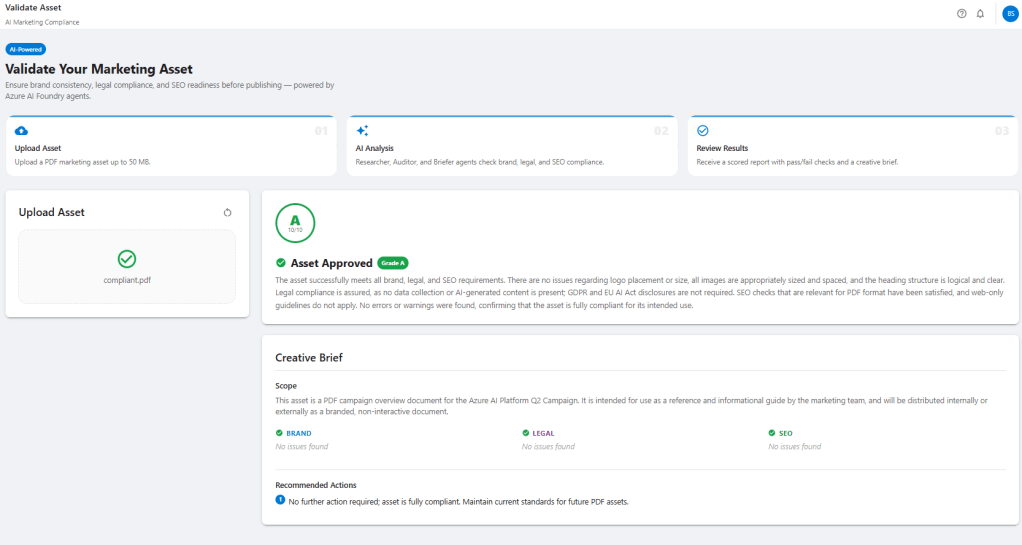
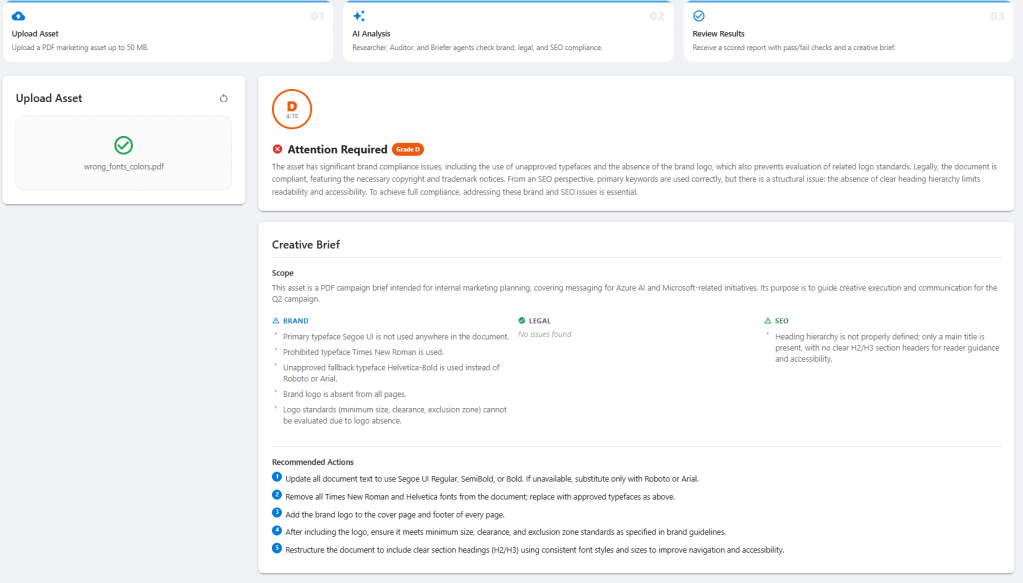
BrandSense implements a simple validation pipeline for documents. A user uploads a PDF and three agents execute sequentially to evaluate the material and produce a structured review.
The Researcher agent retrieves brand, legal, and SEO guidelines from an Azure AI Search index. These guidelines form the basis for evaluating the asset. The Auditor agent then analyzes the document itself, comparing its content against those rules and extracting metadata from the PDF when necessary. Finally, the Briefer agent synthesizes the findings and generates a scored creative brief describing compliance issues and recommended improvements.
The final output provides a rule-by-rule validation report, clearly showing which guidelines passed or failed along with evidence extracted from the document.
Agent Design: Specialize, Don’t Combine
A simple implementation could use a single agent with a long system prompt covering brand, legal, and SEO rules. While that approach works for smaller scenarios, splitting the workflow into specialized agents provides several advantages.
Each BrandSense agent performs a narrowly scoped task.
| Agent | Responsibility |
|---|---|
| brandsense-researcher | queries AI Search and returns structured guideline JSON |
| brandsense-auditor | evaluates the asset and calls MCP tools to extract document metadata |
| brandsense-briefer | synthesizes findings into a scored creative brief |
This separation keeps each agent’s context focused on its specific responsibility. The Researcher only sees search results and asset metadata, while the Briefer receives structured audit results rather than the full document.
The structure also creates clearer failure boundaries. If the Auditor produces malformed output, the issue is isolated to a specific stage in the pipeline. Each agent can evolve independently without affecting the others.
Guidelines as Data: AI Search as the Knowledge Base
One of the most useful patterns in this project is keeping compliance rules out of agent prompts and in a queryable knowledge index.
Instead of embedding brand and legal policies inside system prompts, the rules are stored as structured documents in Azure AI Search.
Each rule is represented as a JSON document:
{
  "id": "brand-001",
  "category": "brand",
  "rule": "Primary Color",
  "value": "#0078D4",
  "description": "Primary blue must be used for all headlines and CTA buttons."
}
Three JSON files (brand.json, legal.json, and seo.json) are loaded into the index by a small ingestion script.
The index uses hybrid vector + semantic search with an integrated vectorizer:
vectorizer = AzureOpenAIVectorizer(
    name="ada-002-vectorizer",
    parameters=AzureOpenAIVectorizerParameters(
        resource_url=OPENAI_ENDPOINT,
        deployment_name=EMBEDDING_DEPLOYMENT,
        model_name="text-embedding-ada-002",
    ),
)
The integrated vectorizer is the key detail. Azure AI Search calls Azure OpenAI directly to generate embeddings at query time using its managed identity. This allows Foundry agents to use the vector_semantic_hybrid search tool without generating embeddings themselves.
The Researcher agent runs three searches (one per category) and returns a structured JSON object containing the relevant guidelines. The Auditor agent evaluates the document against those rules.
When guidelines change, the index can simply be reloaded without redeploying any agents.
MCP: Giving Agents Access to Your Own Services
Some compliance checks require information that cannot be derived from text alone. Brand rules often depend on document-level details such as font families, font sizes, color values, and image dimensions.
To expose that data, BrandSense includes a FastAPI endpoint that extracts document metadata using PyMuPDF:
@app.post("/tools/extract-fonts")
async def extract_fonts(file: UploadFile):
    pdf_bytes = await file.read()
    return extract_font_color_metadata(pdf_bytes)
The service returns font usage, color values, image metadata, and document structure needed for brand validation.
Exposing the Service via MCP
The FastAPI service is exposed as an MCP tool through Azure API Management. In this setup, the service is registered as an MCP server, and the MCP server is integrated into the Auditor agent within the Foundry portal as a tool.
From the agent’s perspective, it operates with a tool named extract-fonts. When this tool is invoked, API Management effectively routes the request to the Container App endpoint that is running the FastAPI service.
The agent instructions clearly outline this process:
You have access to the brandsense-mcp MCP server which exposes the tool extract-fonts.
Call extract-fonts to retrieve the fonts and colors used in the document.
Always call extract-fonts before evaluating typography or color checks.
This pattern generalizes well. Any internal API exposed through API Management can be surfaced as an MCP server, allowing agents to interact with enterprise services without writing custom SDK integrations.
Sequential Chaining via the Responses API
In this design the application orchestrates the pipeline while agents focus on reasoning. The Responses API provides a lightweight way to invoke hosted Foundry agents without introducing additional orchestration layers.
Foundry agents run server-side. Applications invoke them through the Responses API by referencing the deployed agent.
A small helper function wraps the call:
async def _run_agent(openai_client: AsyncOpenAI, agent_name: str, message: str) -> str:
    # Agent IDs are stored as "name:version" in Key Vault
    if ":" in agent_name:
        ref_name, ref_version = agent_name.rsplit(":", 1)
    else:
        ref_name, ref_version = agent_name, None

    agent_ref = {"type": "agent_reference", "name": ref_name}
    if ref_version:
        agent_ref["version"] = ref_version

    response = await openai_client.responses.create(
        input=message,
        extra_body={"agent_reference": agent_ref},
    )
    return response.output_text
A small detail worth noting is the name:version identifier format used by Foundry agents. Passing the combined value directly as the agent name can produce a confusing 404 "with version not found" error. Splitting the identifier into name and version avoids this issue.
Agent execution happens entirely inside the Foundry runtime. Tool calls such as Azure AI Search queries or MCP tool invocations occur during the agent run. From the application’s perspective, the request simply returns once the run completes.
Chaining agents together is therefore straightforward. The output from one agent becomes the input to the next:
researcher_output = await _run_agent(openai_client, settings.researcher_agent_id, researcher_message)
auditor_output    = await _run_agent(openai_client, settings.auditor_agent_id,    auditor_message(researcher_output))
briefer_output    = await _run_agent(openai_client, settings.briefer_agent_id,    briefer_message(auditor_output))
Because agent outputs are passed between stages as text, it’s important to parse structured responses defensively. Models sometimes wrap JSON responses in markdown code fences or return partial structures. BrandSense strips formatting and falls back to extracting the first valid JSON block before deserializing the result.
Streaming Progress to the UI
Each agent call takes several seconds. Waiting for all stages to complete before returning a response makes the UI feel slow.
Instead, the pipeline runs as an async generator that emits newline-delimited JSON (ndjson) events as each stage starts and finishes:
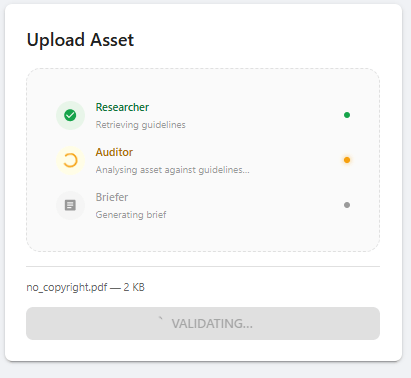
{"event": "progress", "agent": "researcher", "status": "running"}
{"event": "progress", "agent": "researcher", "status": "done"}
{"event": "progress", "agent": "auditor", "status": "running"}
{"event": "progress", "agent": "auditor", "status": "done"}
{"event": "progress", "agent": "briefer", "status": "running"}
{"event": "progress", "agent": "briefer", "status": "done"}
FastAPI streams these events directly:
@app.post("/validate")
async def validate(file: UploadFile, context: str = Form(default="")):
    return StreamingResponse(
        run_pipeline(pdf_bytes=await file.read(), context=context, filename=file.filename),
        media_type="application/x-ndjson",
        headers={"X-Accel-Buffering": "no"},
    )
The X-Accel-Buffering: no header is important. Without it, nginx buffers the entire response before sending it to the client, preventing incremental updates.
The React frontend reads the stream using ReadableStream and updates progress indicators as each agent completes.
Infrastructure in One Command
The complete environment: Azure AI Search, Microsoft Foundry (GPT-4.1 and text-embedding-ada-002), two Container Apps (API and UI), API Management, and Key Vault, is set up using Terraform and coordinated with a single PowerShell script:
.\deploy.ps1 -Subscription "your-subscription" -SetupGitHub
The script performs four phases:
- Terraform infrastructure provisioning
- Container image build and push to Azure Container Registry
- Guideline index seeding in Azure AI Search
- Foundry agent deployment and configuration
The optional -SetupGitHub flag also creates the required Entra app registration and writes OIDC credentials to the GitHub repository.
The only manual step is wiring the APIM MCP endpoint to the Auditor agent in the Foundry portal, since MCP server creation in API Management is currently portal-only.
CI/CD: Deploying and Versioning Agents
In BrandSense, agent deployment is handled as part of the application CI/CD pipeline using GitHub Actions.
The pipeline performs three tasks:
- Provision infrastructure using Terraform
- Deploy application services to Azure Container Apps
- Deploy and version Foundry agents
Agent identifiers are stored in Azure Key Vault using a name:version format:
brandsense-researcher:6
brandsense-auditor:7
brandsense-briefer:1
During deployment the pipeline updates agent definitions, increments versions when necessary, and writes the identifiers to Key Vault. The application retrieves these values at runtime when invoking agents through the Responses API.
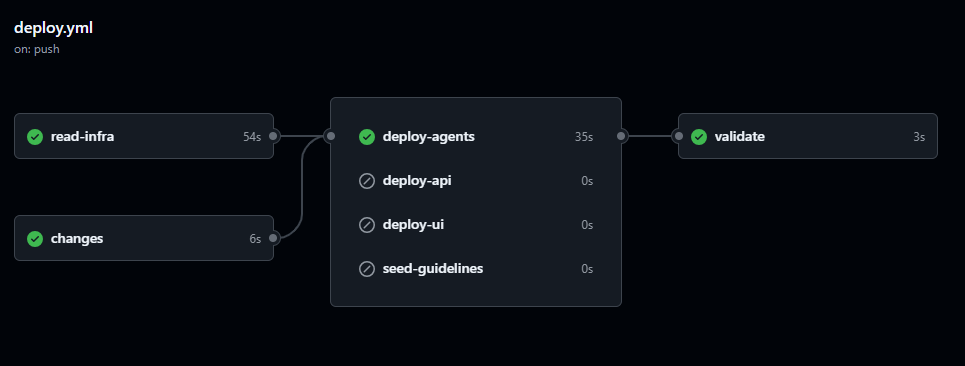
Treating agents as part of the CI/CD pipeline ensures that agent configuration remains versioned alongside application code and that deployments remain reproducible.
Key Takeaways
Sequential multi-agent pipelines work well for domain-specialized workflows.
Breaking complex reasoning tasks into specialized agents keeps prompts focused and reasoning clearer.
Treat rules as data, not prompts.
Storing compliance rules in Azure AI Search allows policies to evolve without redeploying agents.
MCP over API Management provides a clean integration pattern.
Internal services can be exposed as MCP tools without custom SDK integrations.
Agents execute entirely server-side.
Tool calls occur within the Foundry runtime, keeping application orchestration simple.
Deploy agents through CI/CD.
Versioning agents alongside application code ensures reproducible deployments and controlled evolution of agent behavior.
 Stochastic Coder
Leave a Reply