
Introduction
In the rapidly evolving landscape of computer vision and object detection, the Faster R-CNN (Region-based Convolutional Neural Network) stands out as a powerful tool for identifying and localizing objects within images. This article explores the creation of a comprehensive AI damage detection system, employing two custom object detector models based on Faster R-CNN with PyTorch. Our focus will be on identifying objects, specifically shipping containers, and subsequently detecting damage on these containers, with a particular emphasis on resilience against false positives by leveraging synthetic data.

The complete container detection and damage detection solution is available on my GitHub repository: Faster-R-CNN-PyTorch-Damage-Detection
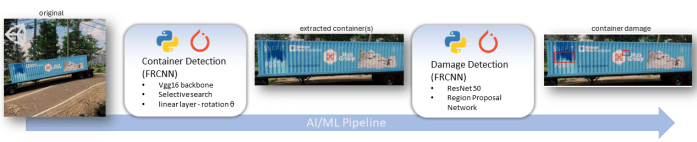
End-to-End Workflow
The synergy between the Container Detection and Damage Detection models forms the backbone of our end-to-end AI solution. Once the Container Detection model identifies a shipping container, the Damage Detection model steps in to meticulously analyze the container for any signs of damage. This comprehensive approach ensures a thorough inspection process, crucial in scenarios where the integrity of shipping containers is paramount, such as in logistics and security applications.
Synthetic Data Augmentation
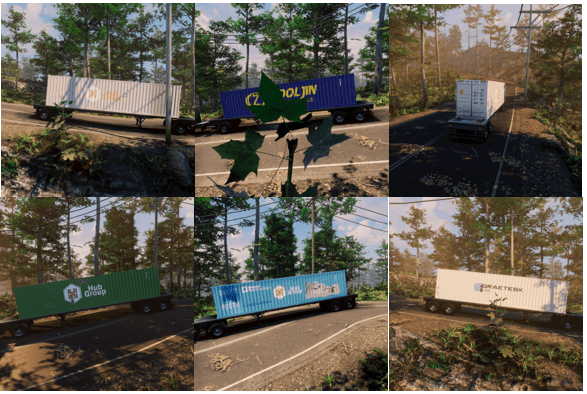
Recognizing the need for a diverse dataset to train our models effectively, synthetic data comes into play. By generating artificial images that mimic various shipping container types and damage scenarios, we ensure our models are exposed to a broad spectrum of situations. This approach not only enriches the dataset but also equips the models with the adaptability required to perform accurately under different environmental conditions.
Examples of generated container data:
1. Object Detection with Faster R-CNN
Our model development begins with the creation of a Faster R-CNN model tailored for Container Detection and also capturing object rotation (theta) for additional processing. This model serves as the first line of defense, identifying the presence of shipping containers in images. To enhance its capabilities, we utilize a VGG16 backbone; VGG16 is known for its deep architecture and high-performance capabilities, making it suitable for complex tasks such as object detection and is well suited for detecting the containers. The integration of SelectiveSearch aids in pinpointing regional proposals, simplifying the subsequent stages of the object detection process; however, this does require additional pre-processing time.
1.1. Image Pre-Processing and Data Preparation
Before we can develop and train the model, it is important to go through a
few additional steps to ensure its accuracy and efficiency.
1.1.1. – Foundation Data Components
This initial Python class serves the purpose of processing annotations within the COCO formatted file and will be useful through-out the solution:
class CoCoDataSet(Dataset):

    def __init__(self, path, annotations=None):
        super().__init__()

        self.path = os.path.expanduser(path)
        with redirect_stdout(None):
            self.coco = COCO(annotations)
        self.ids = list(self.coco.imgs.keys())
        if 'categories' in self.coco.dataset:
            self.categories_inv = {k: i for i, k in enumerate(self.coco.getCatIds())}


    def __len__(self):
        return len(self.ids)

    def __getitem__(self, index):
        id = self.ids[index]

        image = self.coco.loadImgs(id)[0]['file_name']
        im = cv2.imread('{}/{}'.format(self.path, image),1)[...,::-1]
        boxes, categories = self._get_target(id)

        return im, [boxes[0:4]], categories,boxes[4], image
The preprocess_image function takes an image, converts it to a PyTorch tensor, permutes dimensions, normalizes, and moves it to the specified device. The decode function extracts predictions by taking the index of the maximum value along the last dimension of the input tensor _y.
device = 'cuda' if torch.cuda.is_available() else 'cpu'

normalize = transforms.Normalize(mean=[0.485, 0.456, 0.406],
                                 std=[0.229, 0.224, 0.225])
def preprocess_image(img):
    img = torch.tensor(img).permute(2,0,1)
    img = normalize(img)
    return img.to(device).float()
def decode(_y):
    _, preds = _y.max(-1)
    return preds
Now, we move on to the pivotal task of constructing a Dataset class called ContainerDataset. This class will seamlessly integrate with the DataLoader during the model training phase:
class ContainerDataset(Dataset):
    def __init__(self,path, fpaths, rois, labels, deltas, gtbbs,thetas):
        self.fpaths = fpaths
        self.gtbbs = gtbbs
        self.rois = rois
        self.labels = labels
        self.deltas = deltas
        self.thetas = thetas
        self.path = os.path.expanduser(path)
    def __len__(self): return len(self.fpaths)
    def __getitem__(self, ix):
        fpath = str(self.fpaths[ix])
        image = cv2.imread('{}/{}'.format(self.path, fpath), 1)[...,::-1]
        gtbbs = self.gtbbs[ix]
        rois = self.rois[ix]
        labels = self.labels[ix]
        deltas = self.deltas[ix]
        thetas = self.thetas[ix]
        assert len(rois) == len(labels) == len(deltas), f'{len(rois)}, {len(labels)}, {len(deltas)}'
        return image, rois, labels, deltas, gtbbs, fpath,thetas

    def collate_fn(self, batch):
        input, rois, rixs, labels, deltas,thetas = [], [], [], [], [],[]

        for ix in range(len(batch)):
            image, image_rois, image_labels, image_deltas, image_gt_bbs, image_fpath,image_thetas = batch[ix]
            image = cv2.resize(image, (244,244))
            input.append(preprocess_image(image/255.)[None])
            rois.extend(image_rois)
            rixs.extend([ix]*len(image_rois))
            labels.extend( image_labels)
            deltas.extend(image_deltas)
            thetas.extend(image_thetas)

        input = torch.cat(input).to(device)
        rois = torch.Tensor(rois).float().to(device)
        rixs = torch.Tensor(rixs).float().to(device)
        labels = torch.Tensor(labels).long().to(device)
        deltas = torch.Tensor(deltas).float().to(device)
        thetas = torch.Tensor(thetas).float().to(device)
        return input, rois, rixs, labels, deltas,thetas
The dataset initializes with file paths and annotation details. The __getitem__ method retrieves a preprocessed image and associated information for a specified index. The collate_fn method organizes and preprocesses batches of samples, returning tensors ready for model input.
1.1.2. – Calculate Bounding Box Rotation (optional)
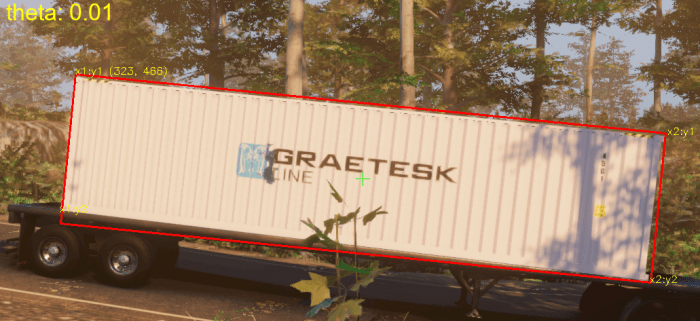
An optional step is calculating the rotation theta of the detected objection.
By considering the rotation theta, the model may better generalize its
understanding regardless of the orientation or angle of the objects; however, I
am primarily capturing theta to extract the container(s) for additional
processing steps when detecting container damage. Here is another example of how I have used object rotation on other projects: Synthetic Data with Unity for Pytorch R-CNN
Rotation Calculation Functions:
# Calculate rotation from max/min segmentation corners
def calc_bearing(corner1, corner2):

    # Difference in x coordinates
    dx = corner2[0] - corner1[0]

    # Difference in y coordinates
    dy = corner2[1] - corner1[1]

    theta = round(np.arctan2(dy, dx), 2)
    return theta


# Calculate theta from segmentation corners
def segmentationCorners2rotatedbbox(corners):
    centre = np.mean(np.array(corners), 0)
    theta = calc_bearing(corners[0], corners[1])
    rotation = np.array([[np.cos(theta), -np.sin(theta)],
                         [np.sin(theta), np.cos(theta)]])
    out_points = np.matmul(corners - centre, rotation) + \
        centre
    x, y = list(out_points[0, :])
    w, h = list(out_points[2, :] - out_points[0, :])
    return [x, y, w, h, theta]


# Convert image segmentation to corners
def segmentationToCorners(segmentation, img_width, img_height):
    corners = [[segmentation[x]*img_width, segmentation[x+1]*img_height]
               for x in range(0, len(segmentation), 2)]

    temp = []

    for x in corners:
        if x not in temp:
            temp.append(x)

    corners = temp

    centre = np.mean(np.array(corners), 0)

    for i in range(len(corners)):
        if corners[i][0] < centre[0]:
            if corners[i][1] < centre[1]:
                corners[i], corners[0] = corners[0], corners[i]
            else:
                corners[i], corners[3] = corners[3], corners[i]
        else:
            if corners[i][1] < centre[1]:
                corners[i], corners[1] = corners[1], corners[i]
            else:
                corners[i], corners[2] = corners[2], corners[i]

    return corners

# Norm bbox on image size
def bboxFromList(bbox, img_width, img_height):
    x = bbox[0] * img_width
    y = bbox[1] * img_height
    w = bbox[2] * img_width
    h = bbox[3] * img_height

    corners = [[x, y], [x+w, y], [x+w, y+h], [x, y+h]]
    c_x, c_y = np.mean(np.array(corners),0) #center x,y

    return [c_x, c_y, w, h]
The calc_bearing function figures out the angle between two corners, while segmentationCorners2rotatedbbox transforms segmentation corners into a rotated bounding box. segmentationToCorners arranges segmentation points into ordered corners. bboxFromList converts normalized bounding box coordinates into a list with center coordinates, width, and height. These functions play a crucial role in tasks related to object detection and image segmentation. Utilize these functions to calculate rotation using segmentation values for each annotation in the COCO formatted file.
Calculate theta from annotations:
annotation_json = coco_json['annotations'][index]


segmentation = annotation_json['segmentation'][0]
img_width = image_json['width']
img_height = image_json['height']

corners = segmentationToCorners(segmentation, img_width, img_height)


s_x, s_y, w, h, theta = segmentationCorners2rotatedbbox(corners)
x, y, b_w, b_h = bboxFromList(bbox, img_width, img_height)
1.1.3. – SelectiveSearch for Region Proposal
Employing a region proposal algorithm such as SelectiveSearch aids in
capturing potential object regions within the images. This technique segments
the image into different regions based on similarity, enabling the model to
focus its attention on the most relevant regions for analysis. This reduces
computational complexity and improves overall efficiency.
The duration of completion for SelectiveSearch is contingent upon the dimensions of the image and the specified parameters, namely scale and sigma.
SelectiveSearch Functions:
import selectivesearch
import numpy as np


def extract_candidates(img):
    img_lbl, regions = selectivesearch.selective_search(img, scale=150, min_size=50,sigma=.8)
    img_area = np.prod(img.shape[:2])
    candidates = []
    for r in regions:
        if r['rect'] in candidates: continue
        if r['size'] < (0.01*img_area): continue
        if r['size'] > (1*img_area): continue
        x, y, w, h = r['rect']
        candidates.append(list(r['rect']))
    return candidates

def extract_iou(boxA, boxB, epsilon=1e-5):
    x1 = max(boxA[0], boxB[0])
    y1 = max(boxA[1], boxB[1])
    x2 = min(boxA[2], boxB[2])
    y2 = min(boxA[3], boxB[3])
    width = (x2 - x1)
    height = (y2 - y1)
    if (width<0) or (height <0):
        return 0.0
    area_overlap = width * height
    area_a = (boxA[2] - boxA[0]) * (boxA[3] - boxA[1])
    area_b = (boxB[2] - boxB[0]) * (boxB[3] - boxB[1])
    area_combined = area_a + area_b - area_overlap
    iou = area_overlap / (area_combined+epsilon)
    return iou
Generate Regional Proposals with SelectiveSearch:
annotations = 'annotations\\annotations.json'
path = '<path_to_images>'


FPATHS, GTBBS, CLSS, DELTAS, ROIS, IOUS, THETAS = [], [], [], [], [], [], []


ds = CoCoDataSet(path, annotations=annotations)

im, bbs, labels, theta, fpath = ds[0]

FPATHS, GTBBS, CLSS, DELTAS, ROIS, IOUS, THETAS = [], [], [], [], [], [], []
N = 500 ## upper limit
bar =''
cntr = min(len(ds),N)
print(cntr)
for ix, (im, bbs, labels, theta, fpath) in enumerate(ds):
    # Processing Progress bar #
    bar_length = 50
    percent = float(ix) / cntr
    hashes = '#' * int(round(percent * bar_length))
    spaces = ' ' * (bar_length - len(hashes))
    sys.stdout.write("\rPercent: [{0}] {1}%".format(hashes + spaces, int(round(percent * 100))))
    sys.stdout.flush()

    if(ix == N):
        break
    H, W, _ = im.shape
    candidates = extract_candidates(im)
    candidates = np.array([(x, y, x+w, y+h) for x, y, w, h in candidates])

    ious, rois, clss, deltas, thetas = [], [], [], [], []
    ious = np.array([[extract_iou(candidate, _bb_)
                    for candidate in candidates] for _bb_ in bbs]).T

    for jx, candidate in enumerate(candidates):
        cx, cy, cX, cY = candidate
        candidate_ious = ious[jx]
        best_iou_at = np.argmax(candidate_ious)
        best_iou = candidate_ious[best_iou_at]
        best_bb = _x, _y, _X, _Y = bbs[best_iou_at]
        #if(best_iou > .02):print(best_iou)
        if best_iou > 0.3:
            clss.append(1)

        else:
            clss.append(0)

        thetas.append(theta)
        delta = np.array([_x-cx, _y-cy, _X-cX, _Y-cY]) / np.array([W, H, W, H])
        deltas.append(list(delta.astype(float)))
        rois.append(list((candidate / np.array([W, H, W, H])).astype(float)))

    FPATHS.append(fpath)
    IOUS.append(ious)
    ROIS.append(rois)
    CLSS.append(clss)
    DELTAS.append(deltas)
    GTBBS.append(bbs)
    THETAS.append(thetas)

FPATHS = [f for f in FPATHS]
FPATHS, GTBBS, CLSS, DELTAS, ROIS, THETAS = [
    item for item in [FPATHS, GTBBS, CLSS, DELTAS, ROIS, THETAS]]

data_json = {'FPATHS': [], 'GTBBS': [], 'CLSS': [],
             'DELTAS': [], 'ROIS': [], 'THETAS': []}
data_json['FPATHS'] = FPATHS
data_json['GTBBS'] = GTBBS
data_json['CLSS'] = CLSS
data_json['DELTAS'] = list(DELTAS)
data_json['ROIS'] = ROIS
data_json['THETAS'] = THETAS


f = open('datafiles\\data_train.json', 'w')
json.dump(data_json, f)
The SelectiveSearch algorithm will systematically generate regional proposals for each image as outlined in the annotation file, utilizing the extract_candidates function. Subsequently, the algorithm will assess the overlap of these generated candidates with the actual bounding boxes through the computation of the intersection over union (IoU) using the extract_iou function. Regional proposals exhibiting overlap ratios surpassing the defined threshold will be categorized under the detected ‘container’ class. Conversely, those failing to meet the threshold criteria will be designated as ‘background.’ The regions, classes, and annotation values are all appended to the output file: ‘data_train.json’. This meticulous process ensures the accurate classification of regional proposals in the context of container detection.
1.2. Container Detection Model with Faster R-CNN
After preparing our dataset, we now possess a JSON document named ‘data_tran.json’, encapsulating essential information such as images, ground truth bounding boxes, class labels (0 for background, 1 for container), rotation theta, and regional proposals. This comprehensive document serves as the foundation for training our Faster R-CNN (FRCNN) model.
1.2.1. – Faster R-CNN Model
Before delving into the training process, it’s imperative to create our model. The FRCNN model specified below is configured to accommodate an image resize of 244 pixels and incorporates the rotational theta feature, ensuring a robust framework for subsequent training and object detection tasks.
Faster R-CNN Model:
import torchvision
import torch
from torchvision.ops import RoIPool
from torchvision.models.vgg import model_urls

class FRCNN(torch.nn.Module):
    def __init__(self,dropout=.4):
        super().__init__()
        model_urls['vgg16_bn'] = model_urls['vgg16_bn'].replace('https://', 'http://')
        rawnet = torchvision.models.vgg16_bn( weights=torchvision.models.VGG16_BN_Weights.DEFAULT)
        for param in rawnet.features.parameters():
            param.requires_grad = True
        self.seq = torch.nn.Sequential(*list(rawnet.features.children())[:-1])
        self.roipool = RoIPool(7, spatial_scale=14/244)
        feature_dim = 512*7*7
        self.cls_score = torch.nn.Linear(feature_dim, 2)
        self.theta_score = torch.nn.Sequential(
              torch.nn.Linear(feature_dim, 512),
              torch.nn.ReLU(),
              torch.nn.Linear(512, 1),
              torch.nn.Tanh(),
            )
        self.dropout_layer = torch.nn.Dropout(dropout)
        self.bbox = torch.nn.Sequential(
              torch.nn.Linear(feature_dim, 512),
              torch.nn.ReLU(),
              torch.nn.Linear(512, 4),
              torch.nn.Tanh(),
            )
        self.cel = torch.nn.CrossEntropyLoss()
        self.sl1 = torch.nn.L1Loss()
        self.thetaloss = torch.nn.L1Loss()
    def forward(self, input, rois, ridx):
        res = input
        res = self.seq(res)
        rois = torch.cat([ridx.unsqueeze(-1), rois*244], dim=-1)
        res = self.roipool(res, rois)
        feat = res.view(len(res), -1)
        cls_score = self.cls_score(feat)
        theta_score = self.theta_score(feat)
        bbox = self.bbox(feat)
        return cls_score,theta_score, bbox
    def calc_loss(self, probs, pred_theta, _deltas, labels,theta, deltas):
        detection_loss = self.cel(probs, labels)

        ixs, = torch.where(labels != 0)
        _deltas = _deltas[ixs]
        deltas = deltas[ixs]
        pred_theta = pred_theta[ixs]
        theta = theta[ixs]
        self.lmb = 10.0
        if len(ixs) > 0:
            regression_loss = self.sl1(_deltas, deltas)
            theta_loss = self.thetaloss(pred_theta, theta)
            return    detection_loss + self.lmb * regression_loss+theta_loss, detection_loss.detach(), regression_loss.detach(),theta_loss.detach()
        else:
            regression_loss = 0
            theta_loss = 0
            return  detection_loss + self.lmb * regression_loss+theta_loss, detection_loss.detach(), regression_loss,theta_loss
The model incorporates a VGG16 backbone with batch normalization, RoIPooling for region-of-interest pooling, and fully connected layers for classification, regression, and rotation angle prediction. The loss calculation method computes detection, regression, and rotation angle losses, with tunable hyperparameters such as dropout rate and a lambda value for balancing loss components. The model is designed to handle cases where no object of interest is present – when len(ixs) > 0 == false
1.2.2. – Training Container Detection Model
Load the JSON document ‘data_train.json’ and partition it into an 80/20 ratio, allocating 80% for training within the ContainerDataset and the remaining 20% for testing in the ContainerDataset.
Load Data and Split into Test/Train:
from torch.utils.data import DataLoader
import torch
from torch.optim import SGD
from data import ContainerDataset
from torch_snippets import *
from model import FRCNN
from torch.utils.tensorboard import SummaryWriter
writer = SummaryWriter()

path = '<path_to_images>'

device = 'cuda' if torch.cuda.is_available() else 'cpu'


n_epochs = 100


FPATHS, GTBBS, CLSS, DELTAS, ROIS, IOUS, THETAS = [], [], [], [], [], [], []

f = open('datafiles\\data_train.json', 'r')
data_json = json.load(f)

FPATHS = data_json['FPATHS']
GTBBS = data_json['GTBBS']
CLSS = data_json['CLSS']
DELTAS = data_json['DELTAS']
ROIS = data_json['ROIS']
THETAS = data_json['THETAS']


print('records: ' + str(len(FPATHS)))

n_train = int(len(FPATHS)*.8)
n_test = len(FPATHS) - n_train

train_ds = ContainerDataset(path, FPATHS[:n_train], ROIS[:n_train],
                        CLSS[:n_train], DELTAS[:n_train], GTBBS[:n_train], THETAS[:n_train])
test_ds = ContainerDataset(path, FPATHS[n_test:], ROIS[n_test:],
                       CLSS[n_test:], DELTAS[n_test:], GTBBS[n_test:], THETAS[n_test:])

train_loader = DataLoader(train_ds, batch_size=6,
                          collate_fn=train_ds.collate_fn, drop_last=True)
test_loader = DataLoader(test_ds, batch_size=6,
                         collate_fn=test_ds.collate_fn, drop_last=True)
Batch Training and Batch Validation Functions:
def decode(_y):
    _, preds = _y.max(-1)
    return preds


def train_batch(inputs, model, optimizer, criterion):
    input, rois, rixs, clss, deltas, thetas = inputs
    model.train()
    optimizer.zero_grad()
    _clss, _theta_score, _deltas = model(input, rois, rixs)
    loss, loc_loss, regr_loss, theta_loss = criterion(
        _clss, _theta_score, _deltas, clss, thetas.view(-1, 1), deltas)
    accs = clss == decode(_clss)
    loss.backward()
    optimizer.step()
    return loss.detach(), loc_loss, regr_loss, theta_loss, accs.cpu().numpy()

@torch.no_grad()
def validate_batch(inputs, model, criterion):
    input, rois, rixs, clss, deltas, thetas = inputs
    with torch.no_grad():
        model.eval()
        _clss, _theta_score, _deltas = model(input, rois, rixs)
        loss, loc_loss, regr_loss, theta_loss = criterion(
            _clss, _theta_score, _deltas, clss, thetas.view(-1, 1), deltas)
        _clss = decode(_clss)
        accs = clss == _clss
    return _clss, _deltas, loss.detach(), loc_loss, regr_loss, theta_loss, accs.cpu().numpy()
Training Model over Epochs:
if(len(test_loader) > 0 and len(train_loader) > 0):

    frcnn = FRCNN().to(device)
    ))
    criterion = frcnn.calc_loss
    optimizer = optim.SGD(frcnn.parameters(), lr=1e-3,momentum=.9, weight_decay = .0005)

    log = Report(n_epochs)

    for epoch in range(n_epochs):

        _n = len(train_loader)
        for ix, inputs in enumerate(train_loader):
            loss, loc_loss, regr_loss, theta_loss, accs = train_batch(inputs, frcnn,
                                                                      optimizer, criterion)
            pos = (epoch + (ix+1)/_n)
            writer.add_scalar("Loss/train", loss.item(), pos)
            writer.add_scalar('Accuracy/train', accs.mean(), pos)
            log.record(pos, trn_loss=loss.item(), trn_loc_loss=loc_loss,
                       trn_regr_loss=regr_loss, trn_theta_loss=theta_loss,
                       trn_acc=accs.mean(), end='\r')

        _n = len(test_loader)
        vl = []
        for ix, inputs in enumerate(test_loader):
            _clss, _deltas, loss, \
                loc_loss, regr_loss, theta_loss, accs = validate_batch(inputs,
                                                                       frcnn, criterion)
            pos = (epoch + (ix+1)/_n)
            vl.append(loss.item())
            if(loss.item() <= max(vl)):
                torch.save(frcnn.state_dict(), 'models\\frcnn_container1.pt')
            writer.add_scalar("Loss/val", loss.item(), pos)
            writer.add_scalar('Accuracy/val', accs.mean(), pos)
            log.record(pos, val_loss=loss.item(), val_loc_loss=loc_loss,
                       val_regr_loss=regr_loss, val_theta_loss=theta_loss,
                       val_acc=accs.mean(), end='\r')

        log.report_avgs(epoch+1)

    writer.close()
    # Display a plot of training and validation loss metrics
    log.plot_epochs('trn_loss,val_loss'.split(','))


else:
    print('test loader: ' + str(len(test_loader)))
    print('train loader: ' + str(len(train_loader)))
1.2.3. – Container Detection Model Inferencing
After training your model, the next step is to make it ready for inferencing. There are different ways to deploy a model, and below, I’ll share the prediction function I use within a Python Flask app.
Model Scorer Function:
def model_predictions(img):

    img = cv2.resize(img, (244, 244))
    H, W, _ = img.shape
    candidates = extract_candidates(img)
    candidates = [(x, y, x+w, y+h) for x, y, w, h in candidates]

    input = preprocess_image(img/255.)[None]
    rois = [[x, y, X, Y] for x, y, X, Y in candidates]
    rois = rois / np.array([W, H, W, H])
    rixs = np.array([0]*len(rois))
    rois, rixs = [torch.Tensor(item).to(device) for item in [rois, rixs]]
    with torch.no_grad():
        model.eval()
        probs, thetas, deltas = model(input, rois, rixs)

        confs, clss = torch.max(probs, -1)

    candidates = np.array(candidates)

    confs, clss, probs, thetas, deltas = [tensor.detach().cpu().numpy() for tensor in [
        confs, clss, probs, thetas, deltas]]

    ixs = clss != 0
    confs, clss, probs, thetas, deltas, candidates = [
        tensor[ixs] for tensor in [confs, clss, probs, thetas, deltas, candidates]]
    bbs = candidates + deltas

    ixs = nms(torch.tensor(bbs.astype(np.float32)), torch.tensor(confs), 0.05)
    confs, clss, probs, thetas, deltas, candidates, bbs = [
        tensor[ixs] for tensor in [confs, clss, probs, thetas, deltas, candidates, bbs]]
    if len(ixs) == 1:
        confs, clss, probs, thetas, deltas, candidates, bbs = [
            tensor[None] for tensor in [confs, clss, probs, thetas, deltas, candidates, bbs]]

    if(len(bbs) > 0):
        bbs = bbs[0]/np.array([W, H, W, H])
        return bbs,theta
    else:
        return [],0
The model_predictions function processes an image, extracts candidate regions, and uses the pre-trained model for container detection. After post-processing with non-maximum suppression, it returns refined bounding boxes and rotation angles (theta) for detected objects or empty lists if none are found.
Extract containers from predictions:
def rotate_image(image, angle):
  image_center = tuple(np.array(image.shape[1::-1]) / 2)
  rot_mat = cv2.getRotationMatrix2D(image_center, angle, 1.0)
  result = cv2.warpAffine(image, rot_mat, image.shape[1::-1], flags=cv2.INTER_LINEAR)
  return result,rot_mat
The rotate_image function takes an image and an angle as inputs, then rotates the image by the specified angle. It calculates the image center, creates a rotation matrix, and applies the rotation using bilinear interpolation. The function returns the rotated image and the rotation matrix.
img = cv2.imread('{}/{}'.format(path, filename),1)[...,::-1]

bbs, theta = model_predictions(img)

x1,y1,x2,y2 = bbs
w = (x2-x1)
x = (x1+x2)/2
y=(y1+y2)/2
h = (y2-y1)

# rotate image
img, rotation = rotate_image(img,theta*(180/np.pi))
rot_rectangle = ((x, y), (w, h), 0)
box = cv2.boxPoints(rot_rectangle)
box = np.int0(box)
# crop to bbox
img = img[box[1][1]:box[0][1], box[1][0]:box[2][0]]

old_image_height, old_image_width, channels = img.shape

# original image was 1600x1600
ratio_w = 800/old_image_width
ratio_h = 800/old_image_height

ratio = min(ratio_w,ratio_h)

img = cv2.resize(img,(int(old_image_width*ratio),int(old_image_height*ratio)) )
old_image_height, old_image_width, channels = img.shape


# create new image, (white) for padding
new_image_width = 800
new_image_height = 800
color = (255,255,255)
result = np.full((new_image_height,new_image_width, channels), color, dtype=np.int16)

# compute center offset
x_center = (new_image_width - old_image_width) // 2
y_center = (new_image_height - old_image_height) // 2

# copy img image into center of result image
result[y_center:y_center+old_image_height,
x_center:x_center+old_image_width] = img
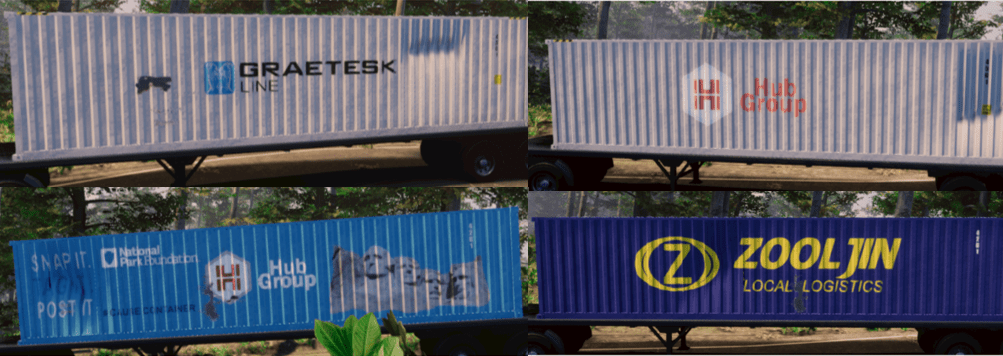
Examples of Extracted Containers:
The container detection model has successfully identified the following containers, subsequently undergoing rotation and cropping processes in preparation for damage detection.
2 Damage Detection with ResNet50:
The second phase of our AI solution involves the deployment of a Damage Detection model. Here, we employ ResNet50, a powerful convolutional neural network known for its deep architecture and exceptional performance in image recognition tasks. ResNet50 plays a crucial role in accurately identifying container damage while distinguishing it from branding and logos. This level of specificity is vital in minimizing false positives and ensuring the reliability of our damage detection system.
The custom Faster R-CNN, utilizing the VGG16 backbone, encountered challenges in accurately identifying various forms and sizes of container damage, ranging from minor scrapes and bends to more substantial dents and holes. This limitation prompted the transition to the ResNet50 model.
2.1 – Image Pre-Processing and Data Preparation
There will be a streamlining of processing steps for container damage detection as we omit the determination of rotation, theta, and refrain from employing SelectiveSearch for regional proposal generation.
2.1.1 – Foundation Data Components
We will create a new dataset class call DamageDataset to accommodate the ResNet50 model and training requirements.
from PIL import Image
from torch.utils.data import Dataset

import os

import torch
import cv2
import numpy as np

device = 'cuda' if torch.cuda.is_available() else 'cpu'

def preprocess_image(img):
    img = torch.tensor(img).permute(2,0,1)
    return img.to(device).float()

class DamageDataset(Dataset):

    def __init__(self,path, fpaths, labels, boxes, image_ids,transforms=None):
        self.fpaths = fpaths
        self.labels = labels
        self.boxes = boxes
        self.image_ids = image_ids
        self.path = os.path.expanduser(path)

    def __len__(self): return len(self.FPATHS)
    def __getitem__(self, ix):

        image_id = self.image_ids[ix]
        fpath = str(self.fpaths[ix])
        img = Image.open('{}/{}'.format(self.path, fpath)).convert("RGB")

        img = np.array(img)/255.0


        boxes = torch.from_numpy(np.array(self.boxes[ix]))


        labels = self.labels[ix]
        target = {}
        target["boxes"] = torch.Tensor(boxes).float()
        target["labels"] = torch.Tensor( labels).long()
        img = preprocess_image(img)
        return img, target

    def __len__(self) -> int:
        return len(self.fpaths)

    def collate_fn(self, batch):
        return tuple(zip(*batch))
2. Damage Detection Model with Faster R-CNN
Instead of constructing a model class, we will utilize the pre-trained Faster R-CNN model, fasterrcnn_resnet50_fpn, available in PyTorch’s torchvision library. It uses a ResNet50 backbone for feature extraction and incorporates a Feature Pyramid Network (FPN) to handle objects of different scales. This model is designed for efficient object detection tasks and can be fine-tuned for specific datasets, such as in our use case of detecting container damage.
2.2.1. Faster R-CNN Model
from torchvision.models.detection.faster_rcnn import FastRCNNPredictor

num_classes =2

def get_model():
    model = torchvision.models.detection.fasterrcnn_resnet50_fpn(pretrained=True)
    in_features = model.roi_heads.box_predictor.cls_score.in_features
    model.roi_heads.box_predictor = FastRCNNPredictor(in_features, num_classes)
    return model
2.2.2 – Training Damage Detection Model
Load the COCO dataset by utilizing the annotations file in the COCO format. Extract labels, images, and bounding boxes into structured lists, followed by a 90%/10% split for training and testing purposes to populate the DamageDataset.
Load Data and Split into Test/Train:
from data import CoCoDataSet, DamageDataset
from torch.utils.data import  DataLoader


annotations = 'annotations\\annotations.json'
path = '<path_to_images>'


device = 'cuda' if torch.cuda.is_available() else 'cpu'


n_epochs = 100

FPATHS, LABELS, BOXES, IMAGE_IDS = [], [], [], []


ds = CoCoDataSet(path, annotations=annotations)

for ix, input in enumerate(ds):
 img, boxes, labels, fpath, image_id = input

 FPATHS.append(fpath)
 LABELS.append(labels)
 BOXES.append(boxes)
 IMAGE_IDS.append(image_id)

n_train = int(len(FPATHS)*.9)
n_test = len(FPATHS) - n_train

train_ds = DamageDataset(path, FPATHS[:n_train], LABELS[:n_train],
                        BOXES[:n_train], IMAGE_IDS[:n_train])
test_ds = DamageDataset(path, FPATHS[n_test:], LABELS[n_test:],
                       BOXES[n_test:], IMAGE_IDS[n_test:])

train_data_loader = DataLoader(
    train_ds,
    batch_size=4,
    collate_fn=train_ds.collate_fn,
    drop_last=True
)

valid_data_loader = DataLoader(
    test_ds,
    batch_size=4,
    collate_fn=test_ds.collate_fn,
    drop_last=True
)
Batch Training and Batch Validation Functions:
def train_batch(inputs, model, optimizer):
    model.train()
    input, targets = inputs
    input = list(image.to(device) for image in input)
    targets = [{k: v.to(device) for k, v in t.items()} for t in targets]
    optimizer.zero_grad()
    losses = model(input, targets)
    loss = sum(loss for loss in losses.values())
    loss.backward()
    optimizer.step()
    return loss, losses

@torch.no_grad()
def validate_batch(inputs, model):
    model.train()
    input, targets = inputs
    input = list(image.to(device) for image in input)
    targets = [{k: v.to(device) for k, v in t.items()} for t in targets]

    losses = model(input, targets)
    loss = sum(loss for loss in losses.values())
return loss, losses- The
train_batchfunction performs a forward pass through the model, computes the loss, backpropagates the gradients, and updates the model parameters. - The
validate_batchfunction moves the inputs to the specified device (e.g., GPU), computes the losses using the model, and returns both the total loss and a dictionary of individual losses. Importantly, this function does not perform any parameter updates.
Training Model over Epochs:
def train():
    from torch.utils.tensorboard import SummaryWriter
    writer = SummaryWriter()

    model = get_model().to(device)
    optimizer = torch.optim.SGD(model.parameters(), lr=0.005,
                                momentum=0.9, weight_decay=0.0005)

    log = Report(n_epochs)

    for epoch in range(n_epochs):
        _n = len(train_data_loader)
        for ix, inputs in enumerate(train_data_loader):
            loss, losses = train_batch(inputs, model, optimizer)
            loc_loss, regr_loss, loss_objectness, loss_rpn_box_reg = \
                [losses[k] for k in ['loss_classifier','loss_box_reg','loss_objectness','loss_rpn_box_reg']]
            pos = (epoch + (ix+1)/_n)
            writer.add_scalar("Loss/train", loss.item(), pos)
            #writer.add_scalar('Accuracy/train', accs.mean(), pos)
            log.record(pos, trn_loss=loss.item(), trn_loc_loss=loc_loss.item(),
                    trn_regr_loss=regr_loss.item(), trn_objectness_loss=loss_objectness.item(),
                    trn_rpn_box_reg_loss=loss_rpn_box_reg.item(), end='\r')

        _n = len(valid_data_loader)
        vl = []
        for ix,inputs in enumerate(valid_data_loader):
            loss, losses = validate_batch(inputs, model)
            loc_loss, regr_loss, loss_objectness, loss_rpn_box_reg = \
            [losses[k] for k in ['loss_classifier','loss_box_reg','loss_objectness','loss_rpn_box_reg']]
            pos = (epoch + (ix+1)/_n)
            vl.append(loss.item())
            if(loss.item() <= max(vl)):
                torch.save(model.state_dict(), 'models\\frcnn_damage.pt')
            writer.add_scalar("Loss/val", loss.item(), pos)
            #writer.add_scalar('Accuracy/train', accs.mean(), pos)
            log.record(pos, val_loss=loss.item(), val_loc_loss=loc_loss.item(),
                    val_regr_loss=regr_loss.item(), val_objectness_loss=loss_objectness.item(),
                    val_rpn_box_reg_loss=loss_rpn_box_reg.item(), end='\r')
        if (epoch+1)%(n_epochs//5)==0: log.report_avgs(epoch+1)


    log.plot_epochs(['trn_loss','val_loss'])
Here’s a breakdown for the training code above:
- TensorBoard Setup: The code initializes a TensorBoard SummaryWriter for logging training progress.
- Model and Optimizer Initialization: It creates an object detection model using the
get_modelfunction, moves it to the specified device, and sets up an SGD optimizer with defined parameters. - Training Loop: The script iterates through a specified number of epochs (
n_epochs). For each epoch, it loops through batches of training data (train_data_loader) and performs the following steps:- Calls the
train_batchfunction to compute training loss and update the model parameters. - Records and logs various losses (e.g., classification, regression) for visualization in TensorBoard.
- Calls the
- Validation Loop: After completing each epoch of training, the code enters a validation loop. Similar to the training loop, it iterates through batches of validation data (
valid_data_loader) and performs the following:- Calls the
validate_batchfunction to compute validation loss. - Records and logs validation losses for visualization.
- Checks if the current validation loss is the minimum observed so far. If yes, it saves the model’s state dictionary to a file (‘models\frcnn_damage.pt’).
- Calls the
- Logging and Reporting: The training and validation losses, along with other metrics, are logged for each epoch. The code uses the
logobject to keep track of and display these metrics. - Model Saving: The model’s state dictionary is saved when the current validation loss is the lowest observed so far.
- Epoch Averaging: Every 1/5th of the total epochs, the script reports average metrics for the training and validation phases.
- Visualization: Finally, the script plots the training and validation losses over the epochs using the
log.plot_epochsfunction.
2.2.3 – Damage Detection Model Inferencing
Upon the successful completion of the damage detection model training, the next step involves forwarding the extracted containers to the model to discern and extract the bounding boxes corresponding to the identified damage instances.
Process Damage:
def get_model():
    model = torchvision.models.detection.fasterrcnn_resnet50_fpn(pretrained=True)
    in_features = model.roi_heads.box_predictor.cls_score.in_features
    model.roi_heads.box_predictor = FastRCNNPredictor(in_features, num_classes)
    return model.to(device)
The get_model function sets up a pre-trained Faster R-CNN model with a ResNet50 backbone from PyTorch’s torchvision library. It adjusts the box predictor head to align with the desired number of output classes (num_classes). The finalized model is returned and sent to the designated device, like a GPU.
from torchvision.ops import nms
def decode_output(output):
    target2label = ['background','damage']
    'convert tensors to numpy arrays'
    bbs = output['boxes'].cpu().detach().numpy().astype(np.uint16)

    labels = np.array([target2label[i] for i in output['labels'].cpu().detach().numpy()])
    confs = output['scores'].cpu().detach().numpy()
    ixs = nms(torch.tensor(bbs.astype(np.float32)), torch.tensor(confs), 0.05)
    bbs, confs, labels = [tensor[ixs] for tensor in [bbs, confs, labels]]

    if len(ixs) == 1:
        bbs, confs, labels = [np.array([tensor]) for tensor in [bbs, confs, labels]]
    return bbs.tolist(), confs.tolist(), labels.tolist()
The decode_output function processes the output of an object detection model. It converts tensors to numpy arrays, applies non-maximum suppression (NMS) with a threshold of 0.05 to filter out redundant bounding boxes, and returns the filtered bounding boxes, confidence scores, and corresponding labels as lists. The target labels are defined as ‘background’ and ‘damage’.
def preprocess_image(img):
    img = torch.tensor(img).permute(2,0,1)
    return img.to(device).float()
Load trained model:
model = get_model()
model.load_state_dict(torch.load("models\\frcnn_damage.pt"))
model.eval()
Detect Damage and Draw Contours:
img_orig =cv2.imread(image_path)
outputs = model([preprocess_image(img_orig/255.0)])

    for ix, output in enumerate(outputs):
        bbs, confs, labels = decode_output(output)
        if(len(bbs)>0):
            for bbox in bbs:
                x1,y1,x2,y2 = bbox
                w = (x2-x1)
                x = (x1+x2)/2
                y=(y1+y2)/2
                h = (y2-y1)
                rot_rectangle = ((x, y), (w, h), 0)

                box = cv2.boxPoints(rot_rectangle)
                box = np.int0(box)
                img_orig = cv2.drawContours(img_orig,[box],0,(0,0,255),2)
Examples of Detected Damage:
The damage detection model has successfully identified instances of damage on the specified containers, with the damaged areas delineated by red bounding boxes.

Conclusion
In summary, our exploration into computer vision highlights the potent Faster R-CNN tool. This article details the development of an AI damage detection system using custom models. Emphasizing synergy between Container and Damage Detection, we employ synthetic data for adaptability. Our approach, enriched by a diverse dataset, culminates in a robust solution that intricately balances computational efficiency and accuracy.

 Stochastic Coder
Leave a reply to pompupking Cancel reply