
When discussing AI—more specifically large language models (LLMs)—we often hyper-focus on the rapid advancements in model capabilities. While these breakthroughs are undeniably impressive, the true transformation happens when these models are integrated into real-world business processes. AI alone doesn’t deliver value until it’s embedded into scalable, secure, and efficient applications. This is where Azure Cosmos DB and Azure App Service shine.
I’ve found these two services to be the perfect power couple for building generative AI retrieval-augmented generation (RAG) solutions. Their synergy provides an ideal foundation for AI-driven applications, enabling scalability, security, and integrations that bridge the gap between model intelligence and user experience.
In this article, we’ll explore the power of these services in building AI-driven applications and demonstrate their capabilities through a real-world example.


The complete code for the solution can be accessed in the GitHub repository: jonathanscholtes/Azure-AI-RAG-Architecture-React-FastAPI-and-Cosmos-DB-Vector-Store
The solution in this article leverages Azure Cosmos DB for MongoDB vCore. If you’re looking for a similar approach using Azure Cosmos DB for NoSQL, check out the following article: Enhance Customer Support with Semantic Kernel and Azure OpenAI.
In this article
- Azure App Service: The AI Integration Backbone
- Azure Cosmos DB: AI-Optimized Data Management
- Security: Private Endpoints and Managed Identity
- Experience ‘Team-Up’ Between Azure Cosmos DB and Azure App Service
- Conclusion
Azure App Service: The AI Integration Backbone
Azure App Service simplifies the deployment of front-end web interfaces and backend integration layers, making it easier to build AI-powered applications. It plays a crucial role in connecting various components:
- Seamless API & UI Deployment – Deploying web applications, chatbots, or AI-driven dashboards is effortless, reducing the operational overhead of managing infrastructure.
- Scalability – Automatically scale applications based on demand, ensuring AI workloads remain performant even under heavy traffic.
- Security & Compliance – Enterprise-grade security features, including authentication, access control, and network isolation, make it a robust choice for AI solutions.
- Multiple languages and frameworks – App Service has first-class support for ASP.NET, ASP.NET Core, Java, Node.js, Python, and PHP
- AI Service Integration – Whether connecting to Azure AI Services, orchestrating chat memory, or integrating vector search, App Service provides the flexibility to bring these components together.
Azure Cosmos DB: AI-Optimized Data Management
AI applications demand a high-performance, low-latency data layer, and Azure Cosmos DB delivers just that. It is purpose-built for real-time, globally distributed applications, making it an ideal choice for RAG-based AI solutions.
- Multimodal Data Storage – Store structured, semi-structured, and unstructured data, including chat history, embeddings, and metadata.
- Vector Search Integration – Store and retrieve vector embeddings, optimizing AI-powered recommendations and semantic search.
- Global Scalability – Distribute AI-driven applications across multiple regions, ensuring low-latency access to data for users worldwide.
- Enterprise Security – Built-in encryption, role-based access, and compliance certifications ensure AI applications remain secure.
Security: Private Endpoints and Managed Identity
Security is a critical factor when deploying AI-powered applications, especially when dealing with sensitive business data. Azure Cosmos DB and Azure App Service offer robust security features, including private endpoints and managed identities, ensuring that AI solutions are protected from unauthorized access and potential threats.
Private Endpoints: Secure Access to AI Data
By default, cloud services are accessible over the public internet, which introduces security risks. Private endpoints provide a secure, private connection between Azure App Service and Azure Cosmos DB, eliminating exposure to the public internet.
- Network Isolation – Traffic between AI applications, Azure AI Services and the database stays within Azure’s private network, reducing attack surfaces.
- Zero Trust Implementation – Enforces strict access control, ensuring that only authorized services can communicate with your AI infrastructure.
- Protection Against Data Exfiltration – Prevents unauthorized access and limits potential attack vectors by restricting traffic to private networks.
Managed Identity: Secure Authentication Without Credentials
One of the biggest security risks in AI applications is storing and managing secrets or credentials. Managed identities in Azure eliminate this risk by providing a seamless, credential-free authentication mechanism between services.
- Eliminate Hardcoded Credentials – No need to store API keys or database credentials in code or configuration files.
- Role-Based Access Control (RBAC) – Grant precise access permissions to App Service, ensuring that it only interacts with the necessary resources.
- Automatic Identity Rotation – Reduces the risk of credential leaks by handling authentication securely at the infrastructure level.
Experience ‘Team-Up’ Between Azure Cosmos DB and Azure App Service
To experience the ‘team-up’ of Azure Cosmos DB and Azure App Service working together, you can deploy a fully functional AI-driven solution from the GitHub repository: jonathanscholtes/Azure-AI-RAG-Architecture-React-FastAPI-and-Cosmos-DB-Vector-Store.
This repository provides a ready-to-deploy implementation of a retrieval-augmented generation (RAG) architecture, combining:
- Azure App Service for scalable deployment and secure hosting.
- React for an interactive AI-driven front-end.
- FastAPI for seamless API interactions and AI service integrations.
- Azure Cosmos DB (Vector Store) for efficient semantic search and retrieval.
After following the steps in the repository to deploy the solution you will be able to test the RAG application by using the assigned domain: https://web-vectorsearch-demo-[random].azurewebsites.net
Once the application loads, test its functionality by submitting the default question, “What is supersonic combustion?”
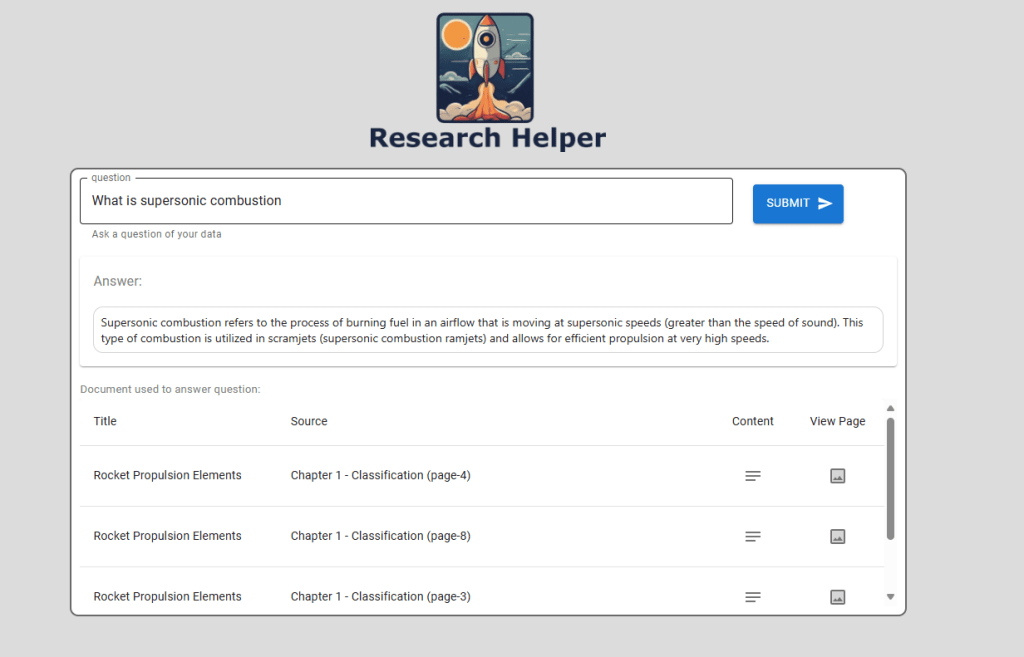
Selecting a returned document pages will display the page images from the Azure Storage Account:

Security in Action with Azure App Service
Let’s explore how Azure App Service ensures a secure implementation for your AI-driven application.
Protecting Secrets with Application Settings
Azure App Service simplifies secure configuration management by allowing developers to store environment variables and connection strings directly within Application Settings. This eliminates the need for hardcoded credentials, reducing security risks.
Seamless Integration with Azure Key Vault
For enhanced security, App Service seamlessly integrates with Azure Key Vault, enabling applications to securely access secrets, API keys, and certificates without exposing them in code. This abstraction ensures that sensitive information remains protected while maintaining a smooth and scalable deployment process.
When deploying our API to Azure App Service, the application setting ‘MONGO_CONNECTION_STRING’ is securely configured as an Azure Key Vault-backed environment variable, ensuring sensitive credentials remain protected.

This is incredibly powerful, as our code doesn’t need to worry about where the connection string is stored—it’s seamlessly retrieved from Azure Key Vault without any additional effort, well just setting-up the Managed Identity.
Please note that Key vault references use the app’s system-assigned identity by default, but you can specify a user-assigned identity. This is handled by the deployment scripts for this solution – allowing the application to use the deployment user-assigned identity.
As shown in the code snippet below, the connection to our Azure Cosmos DB for MongoDB vCore instance is handled seamlessly using an Azure Key Vault secret, just like any other environment variable. This eliminates the need for developers to manually interact with the Key Vault client, simplifying security and access management.
src/api/data/mongodb/init.py
def mongodb_init():
    """Initialize the Azure Cosmos DB vector store."""
    mongo_connection_string = environ.get("MONGO_CONNECTION_STRING")
Secure Access Without Credentials using Managed Identity
The deployed solution leverages managed identity to securely authenticate with Azure Key Vault, Azure Storage, and Azure OpenAI, eliminating the need for storing or managing credentials manually. This approach enhances security by preventing credential exposure, simplifies access management through Azure Role-Based Access Control (RBAC), and ensures seamless integration with Azure services.

LangChain (AzureChatOpenAI) with Azure OpenAI typically requires the OPENAI_API_KEY environment variable. Since we are using Managed Identity, authentication is handled securely by passing a credential token for the OpenAI key and specifying 'azure_ad' as the authentication type, as shown below:
src/api/main.py
# Azure Key Vault and Credential Setup
credential = DefaultAzureCredential()

# Configure Azure OpenAI API Environment Variables
os.environ["OPENAI_API_TYPE"] = "azure_ad"
os.environ["OPENAI_API_KEY"] = credential.get_token("https://cognitiveservices.azure.com/.default").token
os.environ["AZURE_OPENAI_AD_TOKEN"] = os.environ["OPENAI_API_KEY"]
Power AI Workloads with Cosmos DB Semantic Search
With the web frontend and backend integration layers in place, it’s time to focus on the second key component of this powerful duo—Azure Cosmos DB Vector Search.
Azure Cosmos DB provides high-performance vector search, enabling AI applications to retrieve contextually relevant information with low latency. By storing and indexing embeddings generated from Azure OpenAI or other LLMs, Cosmos DB facilitates fast, scalable semantic search, making it a critical component for retrieval-augmented generation (RAG) pipelines.
Loading Embeddings with Azure Functions in Python
To efficiently load vector embeddings into Azure Cosmos DB, we will use Azure Functions with Python. This serverless approach ensures that embeddings are processed dynamically, scaling with demand while minimizing infrastructure overhead.
Integrated with LangChain, the Azure Function will effortlessly generate embeddings from JSON documents and store them in Azure Cosmos DB as soon as they are uploaded to the designated Azure Storage Account. Below is the code snippet responsible for creating embeddings for our RAG pipeline.
src/function_loader/function_app.py
logging.info(f"Create embeddings")
embeddings: AzureOpenAIEmbeddings = AzureOpenAIEmbeddings(
            azure_deployment=environ.get("AZURE_OPENAI_EMBEDDING"),
            openai_api_version=environ.get("AZURE_OPENAI_API_VERSION"),
            azure_endpoint=environ.get("AZURE_OPENAI_ENDPOINT"),
            api_key=environ.get("AZURE_OPENAI_API_KEY"),)

#load documents into Cosmos DB Vector Store
logging.info(f"Create Docs: {len(docs)}")
vector_store = AzureCosmosDBVectorSearch.from_documents(
                docs,
                embeddings,
                collection=collection,
                index_name=INDEX_NAME)

if vector_store.index_exists() == False:
  #Create an index for vector search
  #for a small demo, you can start with numLists set to 1 to perform a brute-force search across all vectors.
  num_lists = 1
  dimensions = 1536
  similarity_algorithm = CosmosDBSimilarityType.COS

  vector_store.create_index(num_lists, dimensions, similarity_algorithm)
Performing Azure Cosmos DB Similarity Search with LangChain
With embeddings successfully loaded into Azure Cosmos DB, we can complete the RAG pattern by performing a similarity search to retrieve documents relevant to the user’s query or conversation.
LangChain, specifically AzureCosmosDBVectorSearch, is utilized to simplify the code for execute similarity searches. The following code demonstrates this process:
src/api/data/mongodb/search/py
def similarity_search(query: str, logger) -> Tuple[List[Resource], List[Document]]:
    """Perform a similarity search and return filtered results."""
    docs = vector_store.similarity_search_with_score(query, 6)

    # Filter documents based on cosine similarity score
    docs_filtered = [doc for doc, score in docs if score >= 0.72]

    # Log and print scores for all documents
    for doc, score in docs:
        print(score)
        logger.info(score)

    # Log the number of documents that passed the score threshold
    num_filtered = len(docs_filtered)
    print(num_filtered)
    logger.info(f'Number of documents passing score threshold: {num_filtered}')

    return [results_to_model(document) for document in docs_filtered], docs_filtered
Conclusion
The perfect power couple of Azure App Service and Azure Cosmos DB provides a robust foundation for building scalable, secure, and high-performing AI-driven applications. By leveraging managed identity, private endpoints, and seamless integration with Azure AI services, this architecture eliminates the need for hardcoded credentials while ensuring fast and reliable data retrieval.
With Azure Cosmos DB Vector Search, AI applications can efficiently store and retrieve embeddings, enabling real-time similarity search to power retrieval-augmented generation (RAG) solutions. Azure App Service, on the other hand, streamlines deployment, API interactions, and user experience, ensuring seamless end-to-end execution of AI workloads.
By implementing this architecture, developers can experience the team-up of these services, bridging the gap between cutting-edge AI models and practical business applications, delivering intelligent, scalable solutions that maximize the potential of generative AI.

 Stochastic Coder
Leave a reply to Deploying AI Agent LLM Web Application on Azure App Service – Stochastic Coder Cancel reply