Building production-grade enterprise agentic platforms requires an architecture that seamlessly unifies fluid, non-deterministic insights with rigid, deterministic deliverables. By strictly decoupling the reasoning layer from data ingestion and file serialization, we can leverage specialized systems for their precise strengths without introducing structural instability or layout drift.
This article implements a robust Insight & Presentation Agent platform using Microsoft Foundry, the Microsoft Fabric Data Agent, and the Model Context Protocol (MCP). By partitioning the architecture into three isolated boundaries, Data Abstraction, Orchestration Logic, and Deterministic Layout Execution, we establish an enterprise framework capable of reliable, repeatable autonomous document generation, specifically PowerPoint Presentations.
Reference Implementation: The complete codebase, infrastructure templates, and sample workflows are available on GitHub: jonathanscholtes/Fabric-Foundry-Insight-Presentation-Agents.
Architectural Patterns Implemented
This architecture decomposes the end-to-end agentic insight lifecycle into three single-responsibility layers, completely isolating implementation details.
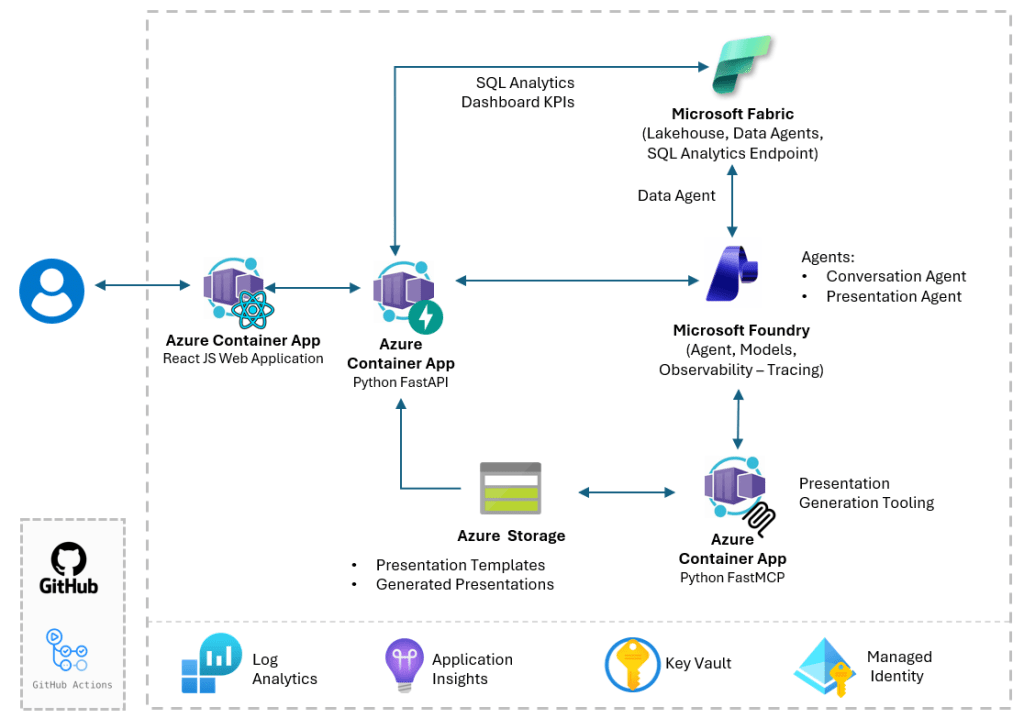
Pattern 1 — Fabric Data Agent as an AI data interface
Generating database queries dynamically within an orchestration prompt introduces schema-drift vulnerabilities and security overhead. This architecture isolates data access via a Fabric Data Agent over the Lakehouse (lh_trucking_ops).
- Downstream agents consume data as a tool via plain-English queries.
- Fabric natively manages semantic mapping, query translation, and data grounding.
- Database connection strings and schemas remain fully abstracted from the reasoning layer.
Pattern 2 — Orchestrated agent reasoning over live operational data
Static context windows restrict interactive data interrogation. The Conversational Agent uses the Microsoft Foundry SDK to maintain stateful, multi-turn threads. Backed by the Fabric Data Agent tool, users can explore trends, isolate regional KPI drivers, and dynamically filter dimensions in real time while Foundry manages session routing server-side.
Pattern 3 — MCP-driven presentation generation
The Presentation Agent orchestrates a deterministic, two-step execution loop via MCP to enforce corporate design compliance:
- Data Retrieval: Gathers precise metrics from the Fabric Data Agent.
- Layout Formatting: Dispatches a validated JSON payload to an isolated FastMCP server using
python-pptxto populate a rigid template (presentation_template.pptx).
MCP establishes an explicit architectural contract. The model only emits data; the protocol handles transport to an isolated rendering runtime.
The User Experience: Orchestrating from the Interface
The dashboard UI acts as a clean control plane for the multi-agent pipeline, tracking execution in real time.
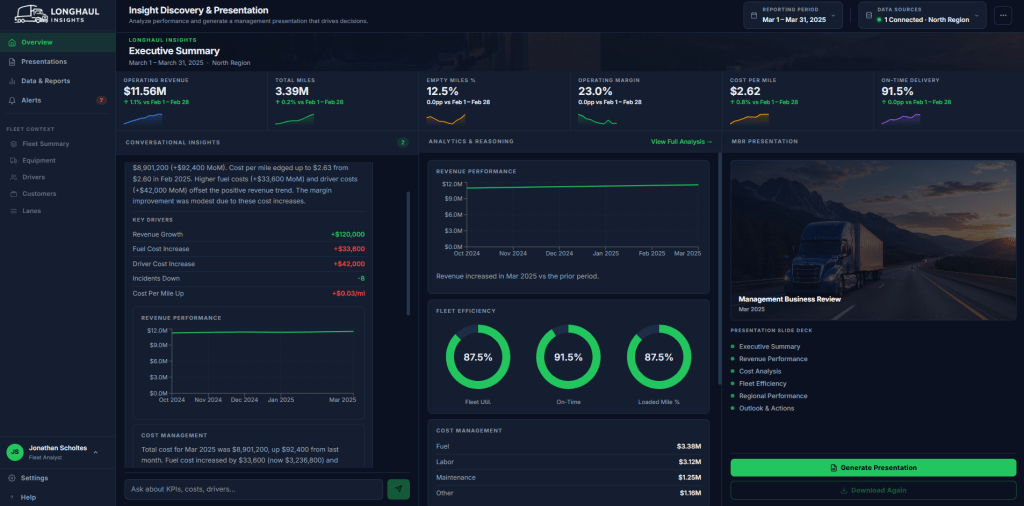
When a user selects a reporting window, the interface displays a fixed corporate agenda required for consistency, blending a combination of agentic insight with key KPIs surfaced from Fabric SQL Analytics:
- Executive Summary & Revenue Performance
- Cost Analysis & Fleet Efficiency
- Regional Performance & Outlook & Actions
Clicking Generate Presentation triggers an asynchronous execution stream.
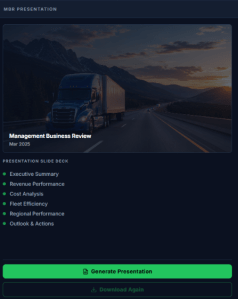
The presentation agent fetches target metrics via Fabric, pipes validated JSON payloads to the internal FastMCP server, and returns a secure Azure Blob Storage download URL instantly.
The Operational Reality: Configuring the Fabric Data Agent
While infrastructure deployment is automated via PowerShell and Terraform, defining agent semantics within the Fabric portal requires manual configuration.
Implementation Note: Complete step-by-step portal walkthroughs, prerequisite checks, and configuration assets for this stage are fully documented in the repository’s Fabric Configuration Guide.
Link your workspace and artifact GUIDs from the Fabric URL, then configure three core boundaries:
1. Grounding the Agent’s Data Scope
Explicitly point the agent to the lh_trucking_ops Lakehouse. In the portal’s data selection tree, select only the verified fact and dimension tables required for automated reporting to eliminate context bloat and ensure correct join logic:
fact_monthly_kpis(Stores operational tracking data like revenue, mileage, costs, on-time delivery percentages, and safety metrics)fact_vehicle_kpis(Tracks performance metrics by discrete vehicle configurations: Flatbed, Refrigerated, Dry Van, Tanker)dim_month&dim_region(Dimensional boundary tables used to filter timeline metrics across 5 US geographic regions over a rolling 13-month timeline)
2. Documenting Model Instructions and Column Notes
Rather than relying on conversational prompts, the Fabric AI Skill interface uses targeted configurations to eliminate query ambiguity. This layer ensures the semantic translation engine maps plain-English questions directly to your relational schema requirements:
- Data Source Description: Provide high-level context regarding the dataset’s boundaries (e.g., detailing the 13-month operational KPI history from May 2024 – May 2025 across your fleet regions and vehicle types).
- Data Source Instructions: Specify explicit semantic rules and relational join logic—such as forcing the model to explicitly join fact tables to
dim_monthonmonth_idanddim_regiononregion_id—to prevent broken query generation. - Example Questions: Seed a baseline of sample natural language queries within the portal to ground the translation layer and provide an immediate verification boundary.
3. Granting Downstream Access
Grant execution access to your Container Apps’ user-assigned managed identity via Azure RBAC. This allows the Foundry runtime to communicate directly with the Fabric agent endpoint using token exchange, eliminating the need to store database connection strings in code.
Deep Dive: Review Microsoft’s official Fabric Data Agent Configuration Best Practices for advanced parameter tuning and enterprise governance.
Core Technical Execution: The FastMCP Server
Generative models excel at contextual analysis but are ill-suited for calculating layout coordinates or enforcing precise design parameters. The internal FastMCP server bridges this gap by handling slide rendering programmatically inside an isolated Azure Container App (ACA) microservice.
Choosing MCP over ad-hoc HTTP endpoints provides three distinct engineering advantages:
- Contract Enforcement: The protocol validates the incoming JSON schema against the tool’s definition before execution, preventing model parameter drift.
- Context Sandboxing: Isolation ensures stateless, code-only file manipulation using
python-pptxand LibreOffice without any model inference overhead during the generation phase. - Tool Portability: Because the service speaks standard MCP, the rendering engine is completely decoupled from the orchestration framework and can be re-used across different agent stacks.
# presentation_tools/server.py
from mcp.server.fastmcp import FastMCP
from pptx import Presentation

mcp = FastMCP("Presentation Tools")

@mcp.tool()
async def fill_presentation_template(template_name: str, kpi_payload: dict) -> dict:
    """Populates an existing enterprise PPTX template with structured KPI data."""
    template_path = f"./templates/{template_name}"
    prs = Presentation(template_path)

    # Programmatic, deterministic slide injection
    slides_processed = populate_slide_metrics(prs, kpi_payload)
    download_url = export_and_upload_deck(prs)

    return {
        "status": "success",
        "download_url": download_url,
        "slides_count": len(slides_processed)
    }
Portability: Adapting the Patterns to Your Domain
The underlying engineering mechanics are domain-agnostic. The identical three-pattern lifecycle applies directly to any industry with structured data and a recurring reporting requirement:
| Target Industry | Data Tier (Pattern 1) | Analytical Focus (Pattern 2) | Automated Output (Pattern 3) |
| Retail | Inventory & Sales Lakehouse | Regional performance & margins | QBR Store Performance Deck |
| Healthcare | Patient Outcomes & Costs | Cost-per-procedure & efficiency | CMO Operational Report |
| Financial Services | Portfolio & Risk Databases | Volatility drivers & anomalies | Client Portfolio Review |
| Manufacturing | OEE & Plant Telemetry | Line downtime & quality metrics | Plant Operations Review |
To adapt this framework: replace the Lakehouse tables, update the system prompts with your domain vocabulary, and swap in your corporate PowerPoint template.
Getting Started: Bootstrapping the Environment
To spin up this architecture, clone the repository and run the automated deployment script to provision resources, build containers, and seed sample tables:
# Authenticate and target your environment
az login
az account set --subscription "YOUR-SUBSCRIPTION-NAME-OR-ID"

# Execute multi-phase infrastructure and agent deployment
.\deploy.ps1 `
    -Subscription      "YOUR-SUBSCRIPTION-NAME-OR-ID" `
    -FabricWorkspaceId "<your-fabric-workspace-guid>"
Key Takeaways
Abstract the Data Tier: Treat database layers as an API. Use Fabric Data Agents to expose data via semantic queries, isolating models from schema evolution.
Enforce Deterministic Layouts: Never let an LLM draw coordinates. Use MCP tools backed by libraries like python-pptx to handle file construction programmatically.
Isolate Responsibilities: Separate your architecture into data, reasoning, and asset-rendering layers to minimize context bloat and failure boundaries.


Leave a Reply